WildcatSage now supports Daily Check-In — a Channel Point Reward that lets viewers check in once per stream and track their streak.
How It Works
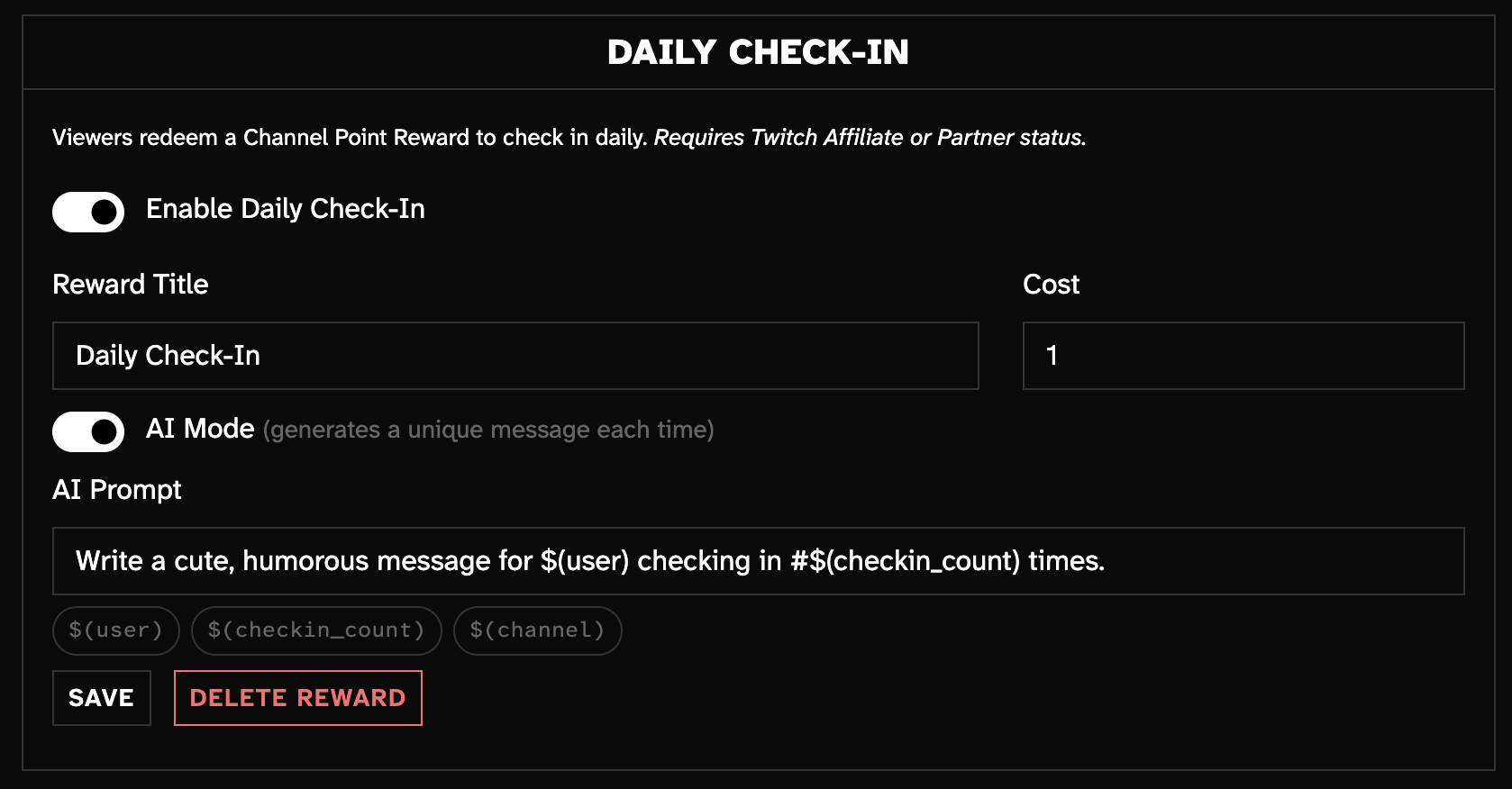
Open the web dashboard, scroll to Daily Check-In, and flip the toggle. Set a title, a Channel Point cost, and a response template. The reward is automatically created on your Twitch channel.
When a viewer redeems the reward, the bot replies with their running total:
"WildcatGamer checked in! Day #14 🎉"
AI Mode
Toggle AI Mode to generate a unique message every check-in. Write a prompt using response variables and the bot will produce something fresh each time:
"Congrats WildcatGamer — 14 days strong! At this rate you'll outlast the sun. ☀️"
Response Variables
Use $(user), $(checkin_count), and $(channel) in your template or AI prompt:
| Variable | What it does |
|---|---|
$(user) |
Viewer's display name |
$(checkin_count) |
Their running check-in count |
$(channel) |
Channel name |
Requirements
- Twitch Affiliate or Partner status (required for Channel Point Rewards)
- You may need to re-authenticate once to grant the new
channel:manage:redemptionspermission